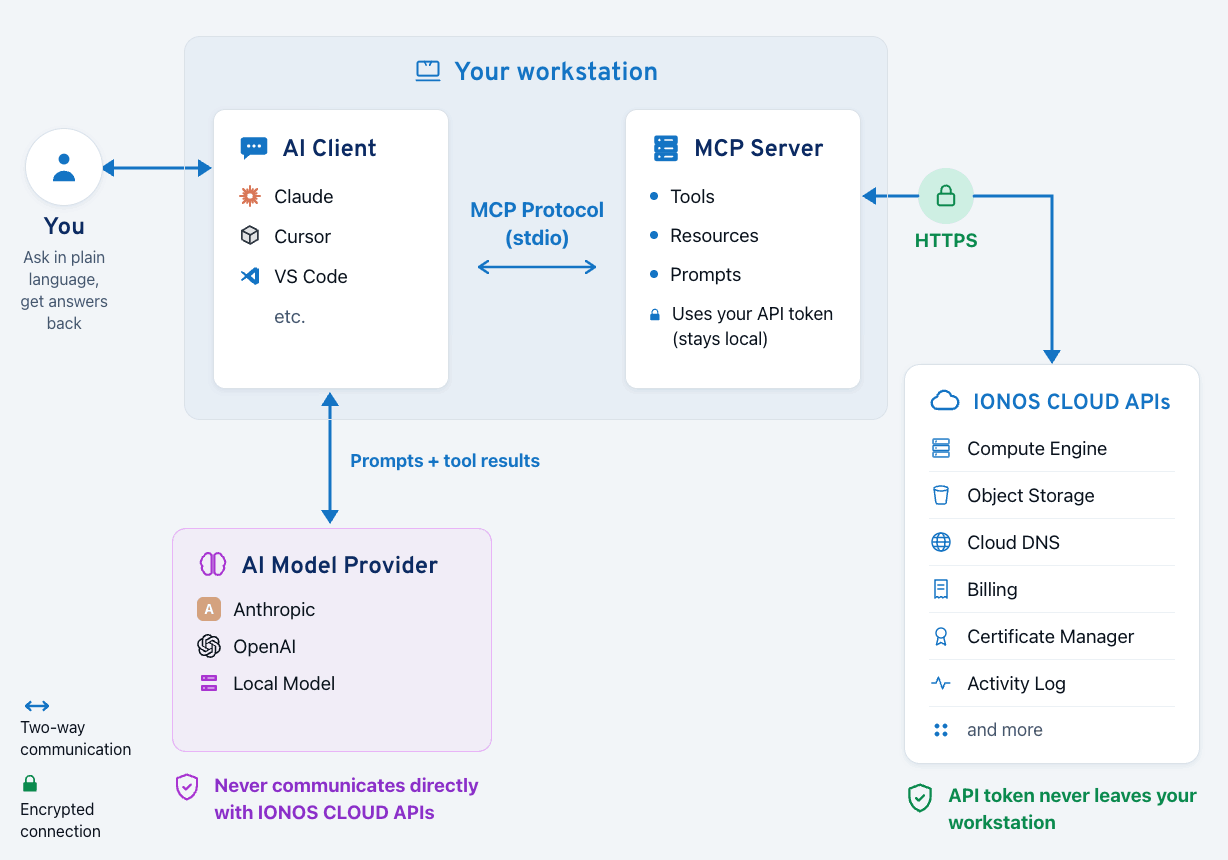
IONOS CLOUD MCP Server Architecture
space.vars.ionos\_cloud\_mcp\_server is a local binary that implements the [Model Context Protocol](https://modelcontextprotocol.io/) (MCP). It connects your AI assistant or autonomous AI agent to your IONOS CLOUD account, letting you inspect your resources through natural language prompts or programmatic agentic loops. With write tools activated, it can also create, update, and delete them. For more information, see [Write Operations](/cloud/ai/mcp-server/configuration/write-operations.md).
## How it works
The MCP server runs as a local process on your machine. Your AI client communicates with it over [stdio](https://docs.ionos.com/cloud/support/general-information/glossary-of-terms#standard-input-output-stdio) using the MCP [JSON-RPC](https://docs.ionos.com/cloud/support/general-information/glossary-of-terms#json-rpc) protocol. The server translates your AI assistant's tool calls into space.vars.ionos\_cloud\_api requests and returns the results as structured text.
The server can also serve the MCP protocol over Streamable HTTP instead of stdio, so that one instance answers several clients over the network. For more information, see [Transport](/cloud/ai/mcp-server/configuration/transport.md).
IONOS CLOUD MCP Server Architecture
space.vars.ionos\_cloud\_api directly over HTTPS. No third-party AI provider sits in the data path between the binary and IONOS CLOUD.
If you activate write tools, the same reasoning applies to the model's decisions, not only to what it reads: the model chooses which resources to create, change, or delete, and those choices are made by the AI client's backend. For more information, see [Write Operations](/cloud/ai/mcp-server/configuration/write-operations.md).
The AI client is separate. It sends your prompts and the JSON returned by MCP tools to its own model backend for inference. For Claude Desktop, Cursor, or VS Code (GitHub Copilot), the backend is operated by a US-headquartered vendor and may be subject to non-EU jurisdiction (for example, the US CLOUD Act) regardless of the inference region. Treat tool outputs (resource names, IDs, IP addresses, billing figures) as data that leaves the IONOS CLOUD perimeter once the AI assistant reads them.
If you need a path where neither the API calls *nor* the inference reach a non-EU provider, pair the MCP server with the [IONOS CLOUD AI Model Hub](/cloud/ai/ai-model-hub.md), which serves open-weight LLMs from IONOS CLOUD German data centers. For more information, see [Fully Sovereign AI Workflow](/cloud/ai/mcp-server/use-cases/sovereign-ai-workflow.md).
## Supported products
| Product | Tools | What you can do |
| ----------------------------------------------------------------------------------------------------------------------------------- | ----------------- | ------------------------------------------------------------------------------------------------------------------------------------------------------------------------------------------------------------------------------- |
| [Compute Engine](https://docs.ionos.com/cloud/compute-services/compute-engine) | 50 read, 69 write | List and inspect data centers, servers, volumes, NICs, LANs, load balancers, NAT gateways, security groups, IP blocks, and more. With write tools enabled, also create, update, and delete them, and control server power state |
| [Managed Kubernetes](https://docs.ionos.com/cloud/containers/managed-kubernetes) | 8 read, 8 write | List and inspect Kubernetes clusters, node pools, nodes, and available versions. With write tools enabled, also manage clusters and node pools: create, scale, upgrade, and delete |
| [IONOS CLOUD Object Storage](https://docs.ionos.com/cloud/backup-and-storage/ionos-object-storage) | 23 | List buckets and objects, inspect bucket configuration (CORS, encryption, lifecycle, replication), and check access keys |
| [Cloud DNS](https://docs.ionos.com/cloud/network-services/cloud-dns) | 14 | List and inspect zones, records, reverse records, secondary zones, and DNSSEC keys |
| [Billing](https://docs.ionos.com/cloud/management/usage/cost-and-usage) | 15 | View invoices, usage, traffic, the product pricing catalog, and the FOCUS v1.3 mapping |
| [Certificate Manager](https://docs.ionos.com/cloud/security/certificate-manager) | 6 | List and inspect certificates, auto-certificates, and providers |
| [Activity Log](https://docs.ionos.com/cloud/observability/activity-logs) | 2 | Query the full audit trail: who did what, when, on which resource |
## Tool scopes
The server is read-only by default. Unless you opt in, all [100+ tools](/cloud/ai/mcp-server/tool-reference.md) across 7 products exclusively perform inspection and query operations, and the server cannot create, update, or delete any space.vars.ionos\_cloud resources. This default lets you connect the MCP server to a production account and share project configurations with teammates without risking accidental modifications.
Write tools for Compute Engine and Managed Kubernetes are available, but they are opt-in. They register only when you set the `IONOS_MCP_TOOL_SCOPE` environment variable:
| `IONOS_MCP_TOOL_SCOPE` | What the Server Can Do |
| ------------------------- | ---------------------------------------------------------------------------------------------- |
| Unset or `read` (default) | Inspect and query only |
| `write` | Also create and update resources, and perform non-disruptive actions such as starting a server |
| `destructive` | Also delete resources and perform disruptive actions such as stopping or rebooting a server |
A tool that the active scope disallows is never registered, so it does not appear in the server's tool list and the AI client cannot call it. Every create, every delete, and every disruptive action requires a two-step confirmation. For more information, see [Write Operations](/cloud/ai/mcp-server/configuration/write-operations.md).
The server runs **locally** on your machine. It does not require a cloud-hosted component.
## MCP resources
In addition to tools, the MCP specification defines **resources**: structured data that the server exposes for AI clients to read as context. The MCP server exposes one resource:
| Resource URI | Content |
| ---------------------------- | ---------------------------------------------------------------------------------------------------------------------------------------------------------------------------------------------------------------------------------------------------------- |
| `ionos://billing/focus-v1.3` | Full FOCUS v1.3 column mapping for all billing tools; use this to build standards-compliant cost pipelines. For more information, see [FinOps and FOCUS Billing](/cloud/ai/mcp-server/use-cases/finops-focus-billing.md). |
Ask your AI assistant to read a resource by name: *"Read the resource ionos\://billing/focus-v1.3."*
## IONOS CLOUD Documentation MCP
The space.vars.ionos\_cloud documentation site at [docs.ionos.com](https://docs.ionos.com/cloud) exposes a **built-in MCP server** at:
```
https://docs.ionos.com/cloud/~gitbook/mcp
```
This is a separate, complementary MCP server powered by GitBook that exposes documentation search and retrieval tools; your AI assistant can query guides, how-tos, reference pages, and release notes by topic. No authentication required. The two servers are independent: use either one alone or both together.
Configure both servers together to combine live infrastructure data with documentation knowledge:
```json
{
"mcpServers": {
"ionoscloud-docs": {
"url": "https://docs.ionos.com/cloud/~gitbook/mcp"
},
"ionoscloud": {
"command": "/usr/local/bin/ionoscloud-mcp",
"env": {
"IONOS_TOKEN": "your-api-token"
}
}
}
}
```
| Server | What it answers |
| ----------------- | ------------------------------------------------------------------------------------------------------------------------- |
| `ionoscloud-docs` | "How does FOCUS billing work?"
"What are the firewall rule limits?"
"What changed in the June 2026 release?"
"List my data centers"
"What is my invoice total?"
"Which certificates expire this month?"
space.vars.ionos\_cloud Certificate Manager documentation and tell me the recommended renewal process.
The AI assistant calls `list_cert_certificates` on the infrastructure server for live data, and searches the documentation server for the renewal guide, all in a single conversation.
For more information, see [Composing Multiple MCP Servers](/cloud/ai/mcp-server/use-cases/agentic-workflows.md#composing-multiple-mcp-servers).
## Next steps
* [Quick Start](/cloud/ai/mcp-server/quick-start.md): install the binary and connect your first client in under five minutes
* [Connect to an AI Client](/cloud/ai/mcp-server/connect-to-an-ai-client.md): per-client setup guides
* [Tool Reference](/cloud/ai/mcp-server/tool-reference.md): full list of all tools
---
# Agent Instructions
This documentation is published with GitBook. GitBook is the documentation platform designed so that both humans and AI agents can read, navigate, and reason over technical content effectively. Learn more at gitbook.com.
## Querying This Documentation
If you need additional information that is not directly available in this page, you can query the documentation by asking a question.
Perform an HTTP GET request on the following URL with the `ask` and `goal` query parameters:
```
GET https://docs.ionos.com/cloud/ai/mcp-server/overview.md?ask=