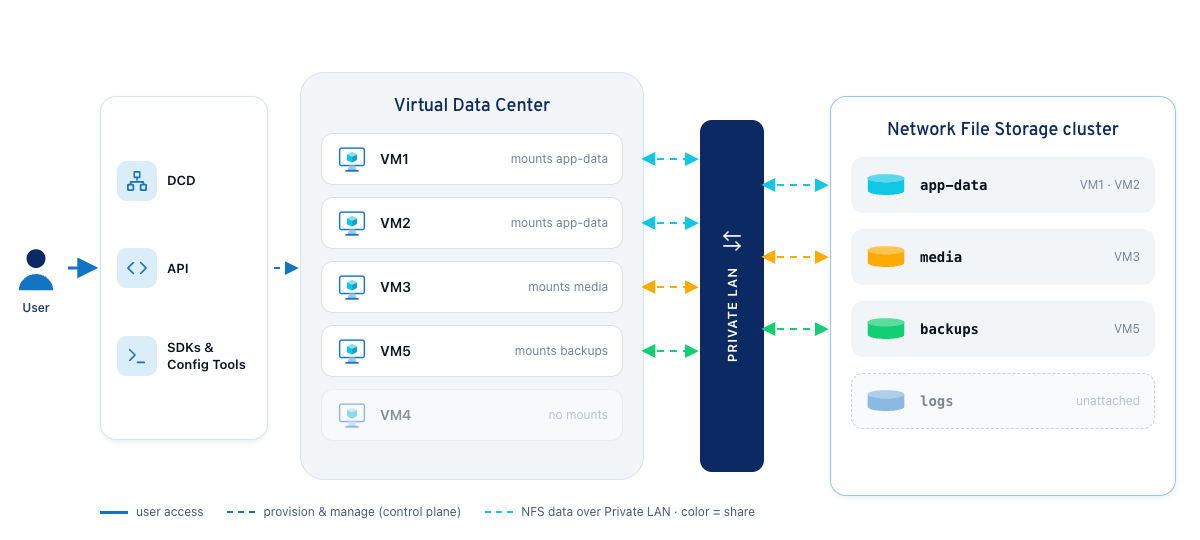
IONOS CLOUD Network File Storage Architecture
IONOS CLOUD Network File Storage Architecture
space.vars.ionos\_cloud manages maintenance operations, such as software updates and hardware replacement, by offering redundant, high-availability cluster services.
NFS clusters automatically use [NIC Multi-Queue](/cloud/network-services/vdc-networking/nic-multi-queue.md), distributing network traffic across multiple queues based on available CPU cores to improve throughput and reduce latency. No configuration is required.
You can also integrate it with Kubernetes clusters to provide persistent storage for containerized workloads.
## How do I set up NFS?
1. **Create a cluster:** Specify a name, location, size, and datacenter LAN. For more information, see [Define cluster properties](/cloud/backup-and-storage/network-file-storage/how-tos/set-up-nfs-cluster.md#define-cluster-properties) and [Associate a Data Center LAN with the cluster](/cloud/backup-and-storage/network-file-storage/how-tos/set-up-nfs-cluster.md#associate-a-data-center-lan-with-the-cluster).
2. **Create a share:** Define share properties and client groups within the cluster. For more information, see [Define share properties](/cloud/backup-and-storage/network-file-storage/how-tos/create-nfs-share.md#define-share-properties) and [Add Client Groups](/cloud/backup-and-storage/network-file-storage/how-tos/create-nfs-share.md#add-client-groups).
3. **Mount the share:** Mount the share on a Linux VM using the cluster's IP address and the share's UUID. For more information, see [Mount an NFS share on a Linux machine](/cloud/backup-and-storage/network-file-storage/how-tos/create-nfs-share.md#mount-an-nfs-share-on-a-linux-machine).
---
# Agent Instructions
This documentation is published with GitBook. GitBook is the documentation platform designed so that both humans and AI agents can read, navigate, and reason over technical content effectively. Learn more at gitbook.com.
## Querying This Documentation
If you need additional information that is not directly available in this page, you can query the documentation by asking a question.
Perform an HTTP GET request on the following URL with the `ask` and `goal` query parameters:
```
GET https://docs.ionos.com/cloud/backup-and-storage/network-file-storage/overview.md?ask=