Confidential VM on an IONOS CLOUD TEE
space.vars.ionos\_cloud secures the underlying platform infrastructure, while you maintain exclusive control over everything within the TEE. For information on what falls outside the responsibility of space.vars.ionos\_cloud, see [Security boundaries](/cloud/compute-services/compute-engine/confidential-computing-vm/overview/limitations.md#security-boundaries-end-users-responsibility).
## How a Confidential VM differs from a standard VM
| **Feature** | **Standard VM** | **Confidential VM** |
| ---------------------- | -------------------------------- | ------------------------------------------------------------------------------------------------------ |
| **Data in memory** | Unencrypted; hypervisor-readable | Hardware-encrypted; hardware-isolated and protected. Memory contents are cryptographically unreadable. |
| **Trust model** | Policy-based ("we won't look") | Hardware-enforced ("we can't look") |
| **Security guarantee** | Contractual commitment | Cryptographic proof |
| **Operator access** | Administrative path exists | Physically impossible |
{% hint style="info" %}
**Important:** Confidential VMs, which run in an space.vars.ionos\_cloud EU data center, in the **Frankfurt-East** `de/fra/2` region, are not subject to the [US CLOUD Act](https://docs.ionos.com/cloud/support/general-information/glossary-of-terms#us-clarifying-lawful-overseas-use-of-data-cloud-act). This provides a hardware-enforced sovereignty guarantee for regulated workloads.
{% endhint %}
## How IONOS CLOUD isolates your workload
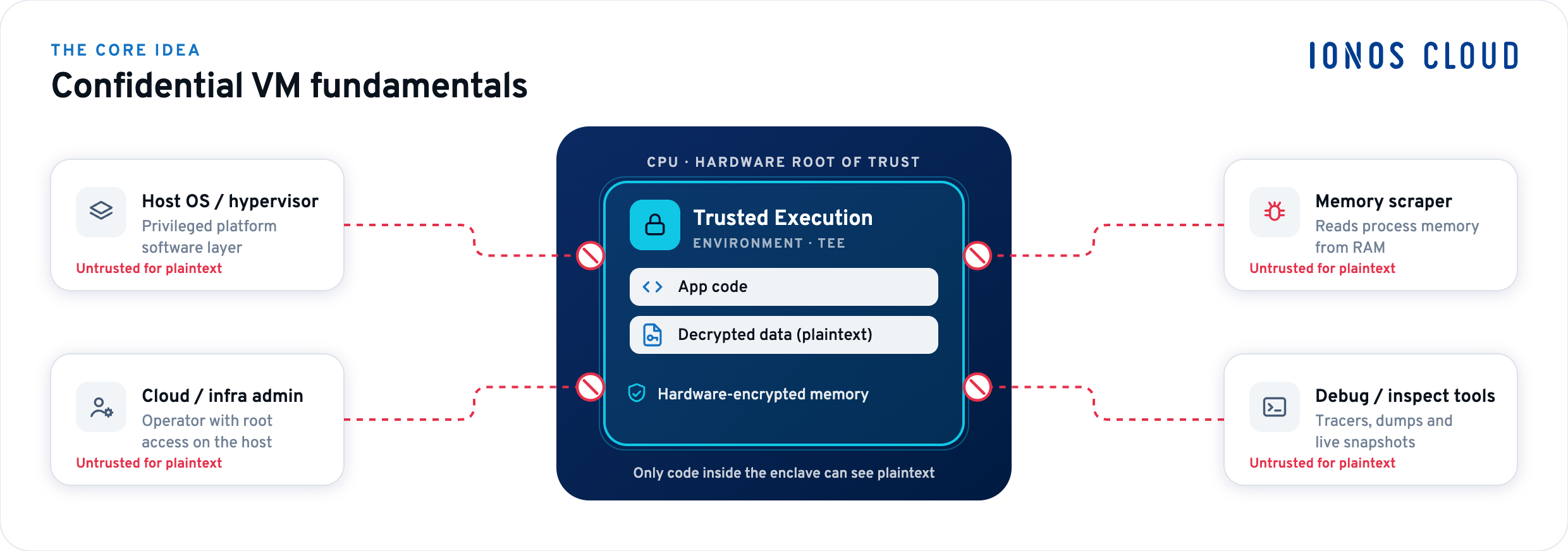
The following illustration shows a Confidential VM isolated within AMD SEV-SNP Trusted Execution Environment, with the host OS, hypervisor, and cloud admin outside the trust boundary:
* **Host-side actors** (Host OS / hypervisor, Cloud / infra admin) operate outside the trust boundary; they see only ciphertext and cannot inject, inspect, or modify the VM state.
* **External attack vectors** (Memory scraper, diagnostic tools) are isolated at the hardware boundary without access path into the TEE or its workloads.
* **IONOS CLOUD** is equally excluded; the AMD CPU generates and holds encryption keys internally. For more information, see [Security and trust model](/cloud/compute-services/compute-engine/confidential-computing-vm/overview/security-and-trust-model.md).
Confidential VM on an IONOS CLOUD TEE
space.vars.ionos\_cloud open-source reference implementation, see [SNPGuard](https://github.com/ionos-cloud/snp-guard). For more information, see [Attest a Confidential VM](/cloud/compute-services/compute-engine/confidential-computing-vm/api-how-tos/attest-confidential-vm.md) and [What is a measurement and how is it computed?](/cloud/compute-services/compute-engine/confidential-computing-vm/overview/security-and-trust-model.md#what-is-a-measurement-and-how-is-it-computed).
3. **Create a Confidential VM:** Use the space.vars.ionos\_cloud\_api to create a Confidential VM at a Confidential VM-capable location. Specify the launch volume built from your image and the required vCPU and memory configuration. For more information, see [Create a Confidential VM](/cloud/compute-services/compute-engine/confidential-computing-vm/api-how-tos/create-confidential-vm.md).
4. **Confidential VM starts:** The `initrd` runs before the OS. If you deployed an attestation service, the attestation client embedded in the `initrd` contacts it, verification runs, the [Volume Master Key (VMK)](https://docs.ionos.com/cloud/support/general-information/glossary-of-terms#volume-master-key-vmk) is released, and the root filesystem is decrypted. Without attestation, the `initrd` is responsible for unlocking the root filesystem on its own. For more information, see [The startup process](/cloud/compute-services/compute-engine/confidential-computing-vm/overview/security-and-trust-model.md#the-launch-process).
5. **Operate:** Monitor attestation events and handle planned maintenance.
---
# Agent Instructions
This documentation is published with GitBook. GitBook is the documentation platform designed so that both humans and AI agents can read, navigate, and reason over technical content effectively. Learn more at gitbook.com.
## Querying This Documentation
If you need additional information that is not directly available in this page, you can query the documentation dynamically by asking a question.
Perform an HTTP GET request on the current page URL with the `ask` query parameter, and the optional `goal` query parameter:
```
GET https://docs.ionos.com/cloud/compute-services/compute-engine/confidential-computing-vm/overview.md?ask=