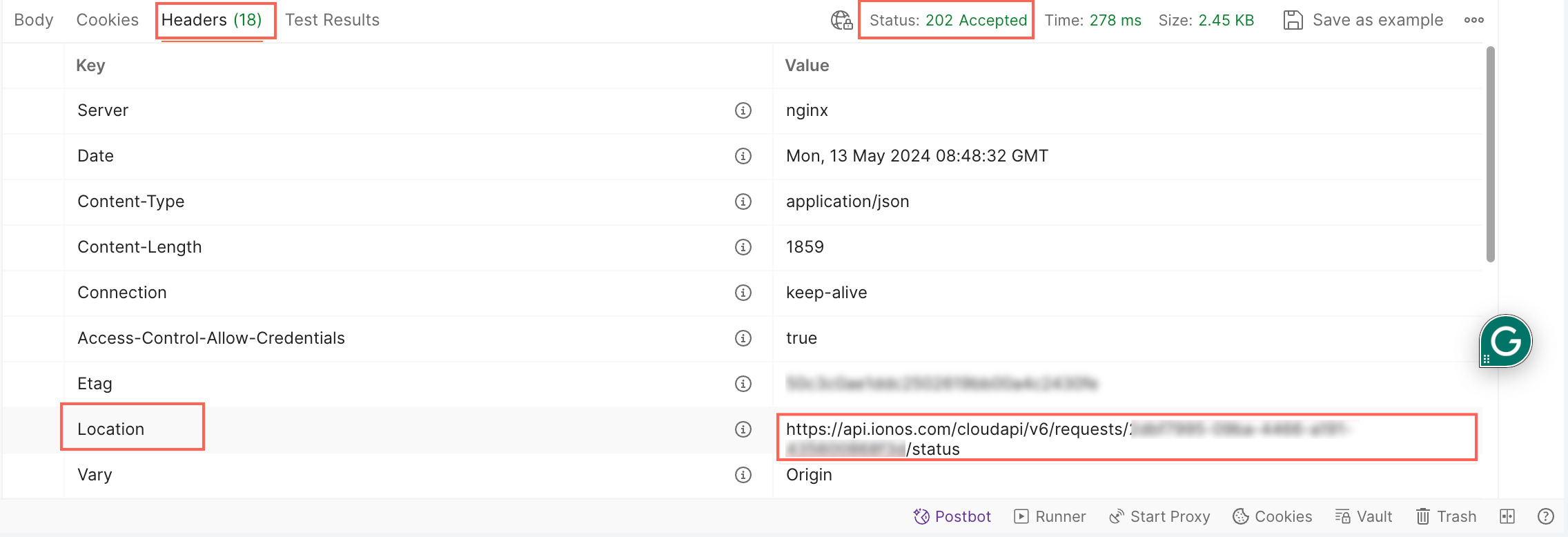
Status URL in Reponse Headers
space.vars.ionos\_cloud\_api and begin integrating them to leverage the capabilities of IONOS Cloud services through this guide.
## Base URL
Provide the Base URL of the space.vars.ionos\_cloud\_api. **Example:** `https://api.ionos.com/`
## Authorization
To log in to the space.vars.ionos\_cloud\_api, you need to use either of the following authentication methods:
{% hint style="info" %}
**Note:**
* All user accounts with currently **2FA enabled** or **forced** need to use the **Bearer Token Authentication** method.
* The **Basic Authentication** method will be discontinued in the near future and it should be used in combination with **2FA** to increase security.
* For the **Reseller** accounts, the **Bearer Token Authentication** improves handling as the additional header token for sub-contracts is not be required.
{% endhint %}
{% tabs %}
{% tab title="Basic Authentication" %}
To authenticate using a Basic Authentication with the space.vars.ionos\_cloud\_api, follow these steps:
1. Request a token using the following `GET` command:
```bash
{{BaseURL}}/auth/v1/tokens/generate
```
2. You need to pass the **encoded Base64** token in your CURL command. You can obtain the [Encoded Base64](https://www.base64encode.org/) format and generate the token by using:
* Username
* Password
3. Once you receive the Base64 encoded token, you can use it in your cURL command to obtain the Basic Authentication token:
```bash
curl --location \
--request GET 'https://api.ionos.com/auth/v1/tokens/generate' \
--header 'Authorization: Basic WVhKemFHRmtMbUoxYzJoeVlVQnBiMjV2Y3k1amIyMDZJMUJoYTJsemRHRnVYekU9' \
--data ''
```
4. If your request is successful, the response will include an access token. This token is a string of characters that serves as your authentication credential for subsequent API requests. Retrieve the access token to interact with the APIs.
{% endtab %}
{% tab title="Bearer Token Authentication" %}
To authenticate using a Bearer Token with the space.vars.ionos\_cloud\_api, follow these steps:
1. Request a token using the following `GET` command:
```bash
{{BaseURL}}/auth/v1/tokens/generate
```
2. You need to pass the **secure token** in your cURL command. You can obtain the secure token by using:
* [Generate authentication token via DCD](https://docs.ionos.com/cloud/set-up-ionos-cloud/management/identity-access-management/token-manager#generate-authentication-token)
* [Generate authentication token via API](#authorization)
* [Generate authentication token via CLI](https://docs.ionos.com/cli-ionosctl/subcommands/authentication/token/generate)
3. Once you receive the secure token, you can use the access token in your cURL command to obtain the Bearer Token:
```bash
curl --location \
--request GET 'https://api.ionos.com/auth/v1/tokens/generate'
--header 'Authorization: Bearer eyJpZCI6MTUsInVzZXJuYW1lIjoia21pbmNoZWxsZSIsImVtYWlsIjoia21pbmNoZWxsZUBxcS5jb20iLCJmaXJzdE5hbWUiOiJKZWFubmUiLCJsYXN0TmFtZSI6IkhhbHZvcnNvbiIsImdlbmRlciI6ImZlbWFsZSIsImltYWdlIjoiaHR0cHM6Ly9yb2JvaGFzaC5vcmcvYXV0cXVpYXV0LnBuZz9zaXplPTUweDUwJnNldD1zZXQxIiwiaWF0IjoxNjM1NzczOTYyLCJleHAiOjE2MzU3Nzc1NjJ9.n9PQX8w8ocKo0dMCw3g8bKhjB8Wo7f7IONFBDqfxKhs' \
--data ''
```
4. If your request is successful, the response will include an access token. This token is a string of characters that serves as your authentication credential for subsequent API requests. Retrieve the access token to interact with the APIs.
{% endtab %}
{% endtabs %}
## HTTP status codes
The space.vars.ionos\_cloud\_apis use the following standard HTTP response codes:
| **Status code** | **Message** | **Description** |
| --------------- | ----------------------- | ------------------------------------------------------------------------------------------------------------------------------ |
| `200` | `OK` | It indicates that the server has successfully processed the request. |
| `201` | `Created` | It indicates that the request has been fulfilled, resulting in the creation of a new resource. |
| `202` | `Accepted` | It indicates that the request has been accepted for processing, but the processing has not been completed yet. |
| `204` | `No Content` | It indicates that the server successfully processed the request, but there is no content to return in the response payload. |
| `400` | `Bad Request` | It indicates that the server cannot process the client's request due to invalid syntax or parameters. |
| `401` | `Unauthorized` | It indicates that the request requires user authentication and the client needs to provide valid credentials for access. |
| `403` | `Forbidden` | It indicates that the server understood the request, but the client does not have permission to access the requested resource. |
| `404` | `Not Found` | It indicates that the requested resource could not be found on the server. |
| `409` | `Conflict` | It indicates that the request could not be completed due to a conflict with the current state of the resource. |
| `422` | `Unprocessable Entity` | It indicates that the server understands the request, but it cannot process it due to semantic errors. |
| `429` | `Too Many Requests` | It indicates that the client has exceeded the rate limit or quota for accessing the server, and the request has been rejected. |
| `500` | `Internal Server Error` | It indicates that the server encountered an unexpected condition that prevented it from fulfilling the request. |
| `503` | `Service Unavailable` | It indicates that the server is temporarily unable to handle the request due to overloading or maintenance. |
## Supported version and authorization methods
| **API** | **Version** | **Supported Authorization Methods** |
| ------------------------------------------------------------------------------------------------------------------------------------------------ | :---------: | ---------------------------------------------- |
| [Activity Log Service](https://api.ionos.com/docs/activitylog/v1) | v1 | Bearer Token |
| [AI Model Hub OpenAI compatible](https://api.ionos.com/docs/inference-openai/v1/) | v1 | Bearer Token |
| [AI Model Hub](https://api.ionos.com/docs/inference-modelhub/v1/) | v1 | Bearer Token |
| [Auth](https://api.ionos.com/docs/authentication/v1/) | v1 | Basic Auth and Bearer Token |
| [CDN](https://api.ionos.com/docs/cdn/v1/) | v1 | Bearer Token |
| [Certificate Manager Service](https://api.ionos.com/docs/certificatemanager/v1) | v1 | Basic Auth and Bearer Token |
| [Cloud Billing](https://api.ionos.com/docs/billing/v3) | v3 | Basic Auth |
| [Cloud](https://api.ionos.com/docs/cloud/v6) | v6 | Basic Auth and Bearer Token |
| [Cloud DNS](https://api.ionos.com/docs/dns/v1) | v1 | Bearer Token |
| [Container Registry](https://api.ionos.com/docs/containerregistry/v1/) | v1 | Basic Auth and Bearer Token |
| [DBaaS In-Memory DB](https://api.ionos.com/docs/in-memory-db/v1/) | v1 | Bearer Token |
| [DBaaS MariaDB](https://api.ionos.com/docs/mariadb/v1/) | v1 | Bearer Token |
| [DBaaS MongoDB](https://api.ionos.com/docs/mongodb/v1) | v1 | Basic Auth and Bearer Token |
| [DBaaS PostgreSQL](https://api.ionos.com/docs/postgresql/v1) | v1 | Basic Auth and Bearer Token |
| [Identity](https://api.ionos.com/docs/identity-policy/v1/) | v1 | Bearer Token |
| [Logging Service](https://api.ionos.com/docs/logging/v1) | v1 | Bearer Token |
| [Monitoring Service](https://api.ionos.com/docs/monitoring/v1) | v1 | Basic Auth and Bearer Token |
| [Monitoring as a Service (Legacy)](https://api.ionos.com/docs/observability-monitoring/v1/) | v1 | Basic Auth and Bearer Token |
| [Network File Storage](https://api.ionos.com/docs/nfs/v1.ea/) | v1 | Bearer Token |
| [Quota](https://api.ionos.com/docs/quota/v1/) | v1 | Basic Auth and Bearer Token |
| [Reseller](https://api.ionos.com/docs/reseller/v2) | v2 | Basic Auth and Bearer Token |
| [IONOS Cloud Object Storage Management](https://api.ionos.com/docs/s3-management/v1/) | v1 | Bearer Token |
| [IONOS Cloud Object Storage (contract-owned buckets)](https://api.ionos.com/docs/s3-contract-owned-buckets/v2/) | v2 | Hash-Based Message Authentication Codes (HMAC) |
| [IONOS Cloud Object Storage (user-owned buckets)](https://api.ionos.com/docs/s3-user-owned-buckets/v2/) | v2 | Hash-Based Message Authentication Codes (HMAC) |
| [VM Auto Scaling](https://api.ionos.com/docs/vmautoscaling/v1.ea) | v1 | Basic Auth |
| [VPN Gateway](https://api.ionos.com/docs/vpn/v1/) | v1 | Bearer Token |
## Request schema
It is the format of the data that is being sent in the request body when interacting with an API endpoint. Request schema has all expected properties, data types, and constraints or validations that should be applied to the request payload. The request schema is specified using `JSON Schema` or another schema definition language supported by OpenAPI.
### Path parameters
Path parameters allow dynamic routing, and you can request different resources using a common endpoint structure. This does not include the **host** or **base path** of the API. For example, in `/datacenter/{datacenterId}`, the path parameter is `datacenterId`.
| **Path parameter** | **Type** | **Required** | **Description** |
| ------------------ | -------- | ------------ | ---------------------------------------- |
| `datacenterId` | string | Yes | The unique identifier of the datacenter. |
| | | | |
### Query parameters
Parameters that are appended to the URL to customize the request and filter data. For example, in `/datacenters?depth=###`, the query parameter is `depth`.
| **Query parameter** | **Type** | **Required** | **Description** |
| ------------------- | -------- | ------------ | ---------------------------------------------------------------------------------------- |
| `depth` | int | Optional | The depth of query parameter used to specify how many levels of URIs should be expanded. |
| | | | |
### Header parameters
Custom headers are expected as part of the request and are sent in the header section. They are usually used for authentication tokens, content type negotiation, caching directives, and other metadata related to the request. HTTP Headers are an important part of the API request and response as they represent the meta-data associated with the API request and response.
{% hint style="info" %}
**Note:** [RFC7230](https://datatracker.ietf.org/doc/html/rfc7230#page-22) states header names are case insensitive.
{% endhint %}
For IONOS Cloud Object Storage, the headers carry information that is compatible with the S3 standard and, therefore, may require specific headers for certain operations.
The following space.vars.ionos\_cloud\_apis use the header parameters:
| **API** | **Supported Header Parameter** |
| -------------- | ---------------------------------------------------------------------------------------------------------------------------- |
| Cloud | `X-Contract-Number` |
| Object Storage | `Content-MD5`, `x-amz-acl`, `x-amz-grant-full-control`, `x-amz-grant-read-acp`, `x-amz-grant-write`, `x-amz-grant-write-acp` |
The following is the description of the header parameters used in space.vars.ionos\_cloud\_apis:
| **Header parameter** | **Type** | **Description** |
| -------------------------- | -------- | ------------------------------------------------------------------------------------------------------------------------------------------------------------------------------------------------------------------------------------------------------------------------------------------------------------------- |
| `X-Contract-Number` | string | It specifies the contract number associated with the account making the request in the space.vars.ionos\_cloud\_api. It is only required for the **reseller master** contract users if they are using Basic Auth as an authentication method. All other users can skip this header. |
| `Content-MD5` | string | It contains a base64-encoded MD5 hash of the request body content, ensuring data integrity during transmission. |
| `x-amz-acl` | string | It sets access control permissions for the resource, defining who can access it. |
| `x-amz-grant-full-control` | string | It grants full control permissions over the resource to the specified users or groups. |
| `x-amz-grant-read-acp` | string | It grants permission to read the Access Control Policy (ACP) for the specified resource. |
| `x-amz-grant-write` | string | It grants write permissions to the specified users or groups for the resource. |
| `x-amz-grant-write-acp` | string | It grants permission to write to the Access Control Policy (ACP) for the specified resource. |
## Request body
The request body is described using a schema that defines the structure and format of the data expected in the body of the request. This schema can include parameters, `JSON`, `XML`, or other data formats specific to the API design. This data is then sent by the client to the server in an HTTP request.
### Request
For example, for `GET` request for `/cloudapi/v6/datacenters` API, we have the following request body sample:
Status URL in Reponse Headers